Custom Figma Plugins · Private Release

The gap between
design files and code,
bridged by Figma plugins

When working from shared Figma files, key implementation details are often missing: Tailwind mapping takes manual effort, spacing logic is unclear, and exporting assets can be repetitive. These two plugins are built specifically for frontend handoff.

View plugins
scroll
Tailwind mapping % / vw units Direct WebP export Dual-size srcset Aspect-ratio estimate Margin / padding estimate Border-radius class Custom export size Merge export without regrouping Tailwind mapping % / vw units Direct WebP export Dual-size srcset Aspect-ratio estimate Margin / padding estimate Border-radius class Custom export size Merge export without regrouping

size-percentage-calculator

Select any layer and get implementation-ready sizing data instantly
v1.0 · personal
Why this exists
P1Spacing often becomes guesswork
When layers are placed directly on canvas without group or auto layout, Dev Mode cannot represent spacing intent clearly, so margin decisions become visual guesses.
P2Dev Mode favors absolute values
Frontend usually needs relative units like % and vw, but Dev Mode mostly provides px / rem. Repeated manual conversion slows handoff.
P3Tailwind mapping is repetitive
Given 24px in design, frontend still has to map it to utilities like p-6 or mt-5 repeatedly.
P4Aspect ratio requires extra math
Design files provide width and height, but implementation often needs nearest standard ratios like 16:9 or 4:3.
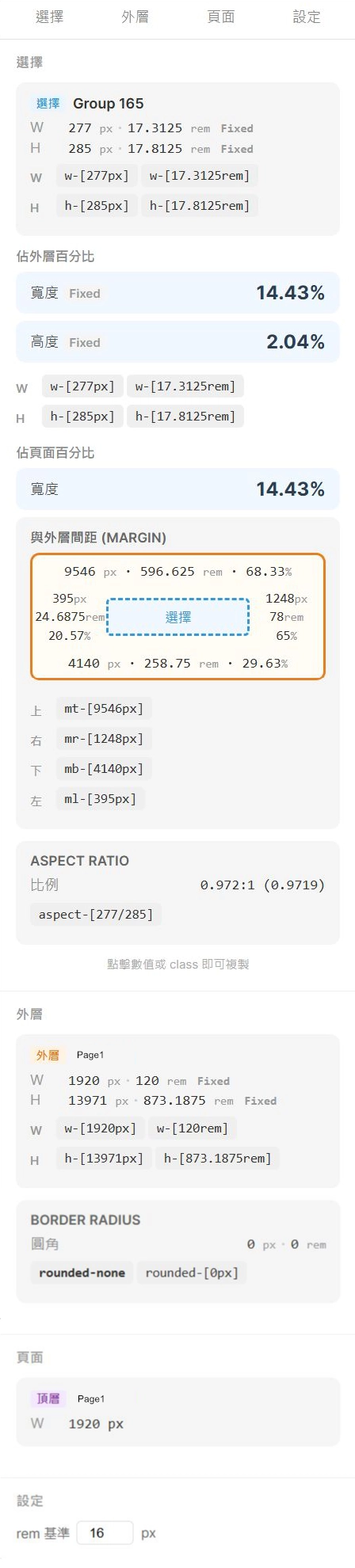
size-percentage-calculator
size-percentage-calculator plugin screenshot
real plugin screenshot
Features
Relative width / height
Shows percentages against parent container and page dimensions.
Spacing estimation
Estimates margin / padding references from layer distances.
Aspect-ratio detection
Maps dimensions to nearest common ratio.
Tailwind utility mapping
Displays numeric values and utility classes side by side.
Selection-based workflow
No setup required. Select a layer and results appear immediately.
The Reality of Design-to-Web Handoff

image-exporter

Preview, validate size, and export in one clean interface
v1.0 · personal
Why this exists
P1Too much UI noise for simple checks
Checking image dimensions in Figma can require navigating through unrelated layer properties.
P2No native WebP export
Figma export often requires extra conversion steps before frontend-ready delivery.
P3srcset usually needs duplicate actions
Producing desktop and mobile variants often requires repeated export work.
P4Range export can force temporary grouping
Exporting selected visual regions can lead to risky temporary structure edits.
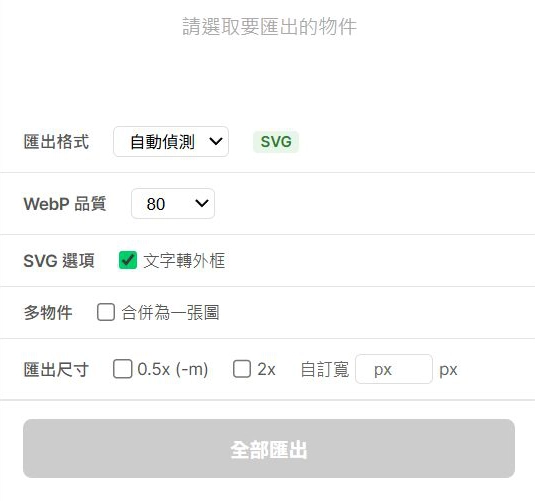
image-exporter
image-exporter plugin screenshot
real plugin screenshot
Features
Direct WebP / SVG export
Export frontend-friendly assets without a separate conversion step.
Dual-size srcset export
Export original and reduced versions in one pass.
Custom export size
Set exact output width directly for implementation needs.
Merge export from selection
Export multiple layers as one image without changing source structure.
Focused preview UI
See the key dimensions quickly, then export in the same place.

Install (Development plugin)

Load locally through Figma development tools — no public listing required
local · dev
Quick setup
S1Use Figma Desktop
Open any file and import your local plugin from the Development menu.
S2Import manifest.json
Choose Development / Import plugin from manifest... and select your plugin manifest.json.
S3Run from Development list
After import, run it from Development. Usually a rerun is enough after code updates.

Purchase

Two payment options are available. Share proof of payment and files will be delivered.
payment
P1Card payment
P2Google Pay

After payment, email your successful order screenshot to hello@user.today. We will send the package files to you.